



Hey everyone,
I have a story to tell. It’s a rollercoaster of legendary customer service followed by some of the most bizarre bad luck I’ve ever seen.
Part 1: The Legendary Turnaround My brand-new Air 3S developed issues within the first two weeks of activation, making it technically a DOA. I sent it back to DJI, and I have to give them credit: they received it and immediately express-posted a full replacement the same day. I had the new unit in my hands the very next day. I was ready to post here and sing their praises... but then I opened the box.
Part 2: The "DOA of a DOA"I unsealed the replacement, started charging the batteries, and plugged in the controller. After a few minutes, the controller just stopped charging. I turned it on to see what was happening (it hadn't even finished the "Select Language" setup yet) and noticed the screen looked like it had severe water damage.
The weird part? There was no water anywhere. The box, the bag, and the unit were bone dry.
The Symptoms:
The Result: So, I’m currently packing up a replacement for a replacement. It’s headed back to the post office in the morning. DJI knows the full story and is handling it, but I’m honestly floored that I managed to get two duds in a row!
I guess I really get to see whether DJI's customer service is as good as people say it is. Round one was a knockout win for them—let's see how they handle the "DOA of a DOA" sequel!
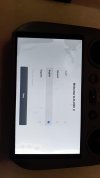
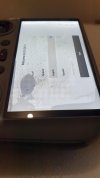
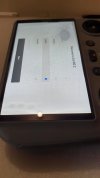
Has anyone ever seen an RC2 screen look like this out of the box? I’ve attached pictures of the speckled pattern and the shifting blobs. I'm curious if I've stumbled onto a bad batch or if I just have the worst luck on the forum right now.
I have a story to tell. It’s a rollercoaster of legendary customer service followed by some of the most bizarre bad luck I’ve ever seen.
Part 1: The Legendary Turnaround My brand-new Air 3S developed issues within the first two weeks of activation, making it technically a DOA. I sent it back to DJI, and I have to give them credit: they received it and immediately express-posted a full replacement the same day. I had the new unit in my hands the very next day. I was ready to post here and sing their praises... but then I opened the box.
Part 2: The "DOA of a DOA"I unsealed the replacement, started charging the batteries, and plugged in the controller. After a few minutes, the controller just stopped charging. I turned it on to see what was happening (it hadn't even finished the "Select Language" setup yet) and noticed the screen looked like it had severe water damage.
The weird part? There was no water anywhere. The box, the bag, and the unit were bone dry.
The Symptoms:
- Heat: Within minutes of just sitting there, the controller hit about 30°C. It felt unusually warm for a device that wasn't even registered or doing any processing yet.
- The "Blobs": As I tilt the controller left to right (at about a 45-degree angle), different blobs appear and disappear. There is a strange, speckled pattern across the entire screen.
- The Diagnosis: After doing some digging and consulting Gemini, it looks like screen delamination. It's possible a solvent (like isopropyl alcohol) or adhesive got trapped in the layers during assembly.
The Result: So, I’m currently packing up a replacement for a replacement. It’s headed back to the post office in the morning. DJI knows the full story and is handling it, but I’m honestly floored that I managed to get two duds in a row!
I guess I really get to see whether DJI's customer service is as good as people say it is. Round one was a knockout win for them—let's see how they handle the "DOA of a DOA" sequel!
Has anyone ever seen an RC2 screen look like this out of the box? I’ve attached pictures of the speckled pattern and the shifting blobs. I'm curious if I've stumbled onto a bad batch or if I just have the worst luck on the forum right now.
Last edited:










