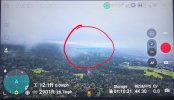
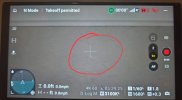
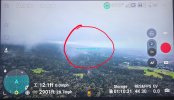
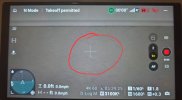
M5P horizon indicator (green line in middle of (RC2) has disappeared. Anyone have any ideas as to why or how to get it back? Still flies and response well. Happened after update. I've been trying with no resolve.

Hey mate! Welcome to the forum! Hmm, maybe it's no longer there after the update- it might have taken it off.M5P horizon indicator (green line in middle of (RC2) has disappeared. Anyone have any ideas as to why or how to get it back? Still flies and response well. Happened after update. I've been trying with no resolve.
Thanks for the welcome! I was thinking the same thing, but others who installed the update are still seeing the indicator. I’m checking every source I can. If anyone finds a solution, please let me know and I’ll do the same. Others are also experiencing the missing indicator as well, and I expect this question will only grow.Hey mate! Welcome to the forum! Hmm, maybe it's no longer there after the update- it might have taken it off.
Check all the screen overlay settings. Sometimes DJI creates a new toggle to enable user control of such a feature where it was unpopular before, as it does interfere with a clear screen, much like the choices for grid overlays and center-point types that can all be turned on or off. By default, it would then now be off, but still able to turned on, if you wanted it. Might just need to find where they hid the setting.Thanks for the welcome! I was thinking the same thing, but others who installed the update are still seeing the indicator. I’m checking every source I can. If anyone finds a solution, please let me know and I’ll do the same. Others are also experiencing the missing indicator as well, and I expect this question will only grow.
I've never seen a horizon indicator or a green line in the middle of the screen.M5P horizon indicator (green line in middle of (RC2) has disappeared.
The pic with the horizon line (green)is a video shot from YouTube which I use to have and the other is what I have now.I've never seen a horizon indicator or a green line in the middle of the screen.
I can't think what it might be.
Do you have a screenshot to show what you are talking about?
See Post #4 above.
The line represents the plane of the drone (like wings on an airplane), not the horizon.The pic with the horizon line (green)is a video shot from YouTube which I use to have and the other is what I have now.
See Post #4 above.
No such screen overlay setting exists...Check all the screen overlay settings. Sometimes DJI creates a new toggle to enable user control of such a feature where it was unpopular before, as it does interfere with a clear screen, much like the choices for grid overlays and center-point types that can all be turned on or off. By default, it would then now be off, but still able to turned on, if you wanted it. Might just need to find where they hid the setting.
I agree with @GagetGuy "No such screen overlay setting exists". I'm going to keep searching and will post "IF" I figure this out. Glad it doesn't affect the flights!No such screen overlay setting exists...
The green horizon indicator will only be visible when the gimbal is exactly at zero degrees rotation. Double press the C1 button to do that.Thank You for your attention to this matter.
Color me doubtful. I’ve had the Mini 5 Pro for four months and have never seen the indicator.The green horizon indicator will only be visible when the gimbal is exactly at zero degrees rotation. Double press the C1 button to do that.Thank You for your attention to this matter.
@Captain Tuttle Thanks for the info. I’ve already tried C1, re-setting C1, manually zeroing the gimbal, and I’ve checked all overlays, but I’m still having no luck. I will keep trying!Color me doubtful. I’ve had the Mini 5 Pro for four months and have never seen the indicator.
We use essential cookies to make this site work, and optional cookies to enhance your experience.