


DJI Mavic, Air and Mini Drones
Friendly, Helpful & Knowledgeable Community
Join Us Now

Christmas Light Video Help

BikerGeek

Well-Known Member
Joined
Feb 27, 2018
Messages
70
Reactions
35
Age
63
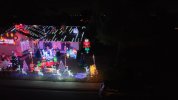
I filmed my Christmas house using my Air 3s for the first time this year. I've used my Mavic Pro and my Air 2 and never had weird results such as this. When filming the lights on the roof it will look like large swaths of lights are out only to show up when flying over them. They're LED lights. It almost looks like the lights that aren't showing up are at a wrong angle? Yet when I take a photo, it looks fine. The first shot is a screen shot from the video. The second is a photo I took.

I just had it set for Auto. Any suggestions on settings? I know there are night settings but what about filming bright lights at night?
 

Attachments

  • SnapShot.jpg
    SnapShot.jpg
    214.2 KB · Views: 73
  • DJI_20251217195409_0002_D.JPG
    DJI_20251217195409_0002_D.JPG
    1.8 MB · Views: 71
The LED lights are lit by alternating current and the shutter speed of the video is too fast to allow for an individual video frame to show everything properly lit up. If you change the shutter speed of the photo to match the video shutter speed, it will look the same. However, the photo shutter speed is slow enough to allow all the LED's to light up during the exposure.

Cool Xmas display!
 
  • Like
Reactions: Cymruflyer
AC on the lights shouldn't matter.
If incandescent, they won't "strobe" because the element in the lights doesn't cool down fast enough between peaks to make a difference.
LEDs often have a driver, but not always. If they have a driver then it will have it's own PWM independent of the voltage supplied because the LEDs aren't running on house voltage. The voltage is dropped down to a maximum of 12v through the driver.
Not all drivers use PWM either. It depends on what LEDs are built into the string.
 
AC on the lights shouldn't matter.
If incandescent, they won't "strobe" because the element in the lights doesn't cool down fast enough between peaks to make a difference.
LEDs often have a driver, but not always. If they have a driver then it will have it's own PWM independent of the voltage supplied because the LEDs aren't running on house voltage. The voltage is dropped down to a maximum of 12v through the driver.
Not all drivers use PWM either. It depends on what LEDs are built into the string.
However, it is clearly a strobing issue where the video shutter speed is faster than the still frame shot. How do you explain the OP's results?
 
I'll try playing around with the shutter speed tonight. It's odd though. Why is it only doing it with the lights on the roof? I edited the video down to 30 seconds or so to show what's happening.
To view this content we will need your consent to set third party cookies.
For more detailed information, see our cookies page.
 
I filmed my Christmas house using my Air 3s for the first time this year. I've used my Mavic Pro and my Air 2 and never had weird results such as this. When filming the lights on the roof it will look like large swaths of lights are out only to show up when flying over them. They're LED lights. It almost looks like the lights that aren't showing up are at a wrong angle? Yet when I take a photo, it looks fine. The first shot is a screen shot from the video. The second is a photo I took.

I just had it set for Auto. Any suggestions on settings? I know there are night settings but what about filming bright lights at night?
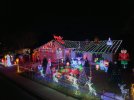
Hmmmm...they both look good to me. Mayhaps it's my lousy eyesight?

But my eyesight is good enough to tell this is an amazing Christmas display!

Merry Christmas!
Livingston
 
However, it is clearly a strobing issue where the video shutter speed is faster than the still frame shot. How do you explain the OP's results?
Yes, they strobe but not because of the house current. They "look" dimmer because of PWM (Pulse Width Modulation).
Basically the LEDS pulse on and off, not a true strobe, with their own frequency.

I don't know if his LED strips are adjustable but of they are, turning them brighter or dimmer would show the effects of the PWM.
 
Hmmmm...they both look good to me. Mayhaps it's my lousy eyesight?

But my eyesight is good enough to tell this is an amazing Christmas display!

Merry Christmas!
Livingston
You are not understanding the problem, it is the gaps in the light strings, they are not there to the naked eye. It is a shutter setting problem. I get it on my Mavic 2 Pro when I have the wrong shutter setting on Christmas tree lights outdoors.
 
  • Like
Reactions: GadgetGuy
The Shutter Speed was the issue. Once I moved it off of auto and adjusted the shutter speed everything looks great. Probably could have used a polarization filter to get rid of the glare from the red spotlights around the reindeer but all in all it looks ok. Here's the finished video:
To view this content we will need your consent to set third party cookies.
For more detailed information, see our cookies page.
 
The Shutter Speed was the issue. Once I moved it off of auto and adjusted the shutter speed everything looks great. Probably could have used a polarization filter to get rid of the glare from the red spotlights around the reindeer but all in all it looks ok. Here's the finished video:
To view this content we will need your consent to set third party cookies.
For more detailed information, see our cookies page.
What did you need to manually set the video shutter speed to be?
Any darkening filter would have accomplished the same thing, forcing a slower shutter speed even in Auto.
 
What did you need to manually set the video shutter speed to be?
Any darkening filter would have accomplished the same thing, forcing a slower shutter speed even in Auto.
In looking at the SRT file it's showing that Shutter was 1/60 (I was shooting at 4k 30 fps) and ISO of 1600.
 

DJI Drone Deals

New Threads

Members online

Forum statistics

Threads
139,818
Messages
1,652,163
Members
167,959
Latest member
djipilot55
Want to Remove this Ad? Simply login or create a free account






