


DJI Mavic, Air and Mini Drones
Friendly, Helpful & Knowledgeable Community
Join Us Now

DaVinci Resolve: "Media Offline" error with M3P

Robw_z

Member
Joined
Aug 3, 2025
Messages
22
Reactions
5
Age
42
Location
Boise, ID
Hi all,

I have both the M3P & M4P, I kept the M3P once I upgraded because I like the 24mm camera as compared to the 28mm.

In DaVinci Resolve; my media from the M4P drops in fine while videos from the M3P do not. I did a fair amount of searching the forums here and did not see a similar issue, also tried some tricks from YouTube but no dice. I did have to get the HVEC codec for the M4P to work, but the M3P still does not work.

The only difference between the two is M3P is recording in H.264, while M4P is recording in H.265 - starting a new project and only importing M3P footage does not fix the issue (in case compatibility between the two in a single project is suspected as the cause).

Thanks for any tips or advice!
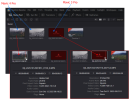
DavinciResolve_MediaOffline.png
-Rob
 
Correct. Version 20.1 Build 7. Free version, not Studio.
Ok, I normally use h265 but my 4k60 in h.264 (because I used the other camera) is working fine on Studio.

Will try something will higher resolution.
 
I believe the free version is limited to 4K max. Your M3P clips were shot in 5K by the look of it 5120x2700. There might be the problem
I think you may be right, but I wish it would just come out and say "incompatible resolution" or something more direct to the problem. Most of the YouTube troubleshooting I did relates to resolving file-pathing issues, but both the M3P and M4P videos have the same file path. I guess the only way to find out may be to shell out $295 for Studio.
 
I think you may be right, but I wish it would just come out and say "incompatible resolution" or something more direct to the problem. Most of the YouTube troubleshooting I did relates to resolving file-pathing issues, but both the M3P and M4P videos have the same file path. I guess the only way to find out may be to shell out $295 for Studio.
There may be a BF deal on DR studio coming up and especially if you can get the Speed Editor combo, it would be good savings.
 
I think you may be right, but I wish it would just come out and say "incompatible resolution" or something more direct to the problem. Most of the YouTube troubleshooting I did relates to resolving file-pathing issues, but both the M3P and M4P videos have the same file path. I guess the only way to find out may be to shell out $295 for Studio.
The Studio has many more benefits than just resolution. It utilises GPU much better, many more fusion titles and filters etc etc. To me it is a no brainer if you take editing seriously. All updates are free too 😀
 
Last edited:
  • Like
Reactions: anotherlab
I think you may be right, but I wish it would just come out and say "incompatible resolution" or something more direct to the problem. Most of the YouTube troubleshooting I did relates to resolving file-pathing issues, but both the M3P and M4P videos have the same file path. I guess the only way to find out may be to shell out $295 for Studio.
It still amazes me that the Resolve Studio is so reasonably priced for what it can do (compared to the cost of other, similarly featured softwares).
 
It still amazes me that the Resolve Studio is so reasonably priced for what it can do (compared to the cost of other, similarly featured softwares).
Not only that but sometimes it is on a special. I got it as a bundle with the Speed Editor Panel for the price of the Speed Editor, so the Studio was basically free.
 
Last edited:
  • Like
Reactions: mavic3usa
It still amazes me that the Resolve Studio is so reasonably priced for what it can do (compared to the cost of other, similarly featured softwares).
To a certain extent, the consumer-level versions of Davinci Resolve are subsidized by the commercial versions.
 
To get Studio, keep an eye out on ebay for an official dongle. Once bought, it will work for every version to come.
As each BMD camera ships with a USB dongle they do become available.

Media Offline used to be solved by deleting Render Cache and letting the project render out again.
 
I appreciate the advice, but never ended up seeing Blackmagic Design or B&H reduce prices around or during Black Friday; as well as up to now.

B&H originally had the Speed Editor + Software priced at $425.00, then it went "on sale" for $425.00 (marked down from $475.00), then it actually went up to $475.00. It's the time of year for spending regrettable amounts of money, so I just ended up paying out $475.00 to get it over with.

Thanks for the tips!

-Rob
 
I appreciate the advice, but never ended up seeing Blackmagic Design or B&H reduce prices around or during Black Friday; as well as up to now.

B&H originally had the Speed Editor + Software priced at $425.00, then it went "on sale" for $425.00 (marked down from $475.00), then it actually went up to $475.00. It's the time of year for spending regrettable amounts of money, so I just ended up paying out $475.00 to get it over with.

Thanks for the tips!

-Rob
Congrats on getting the Speed Editor. I'd recommend to watch the tutorial YT video on BM website to familiarise yourself with its features and all the buttons. It is a complex piece of kit but once you get the hang of it you will find it extremely helpful for quickly getting through all your clips and putting the good bits on timeline in correct order etc. It is very fast and efficient way of working.
 
  • Like
Reactions: mavic3usa

DJI Drone Deals

New Threads

Members online

Forum statistics

Threads
139,759
Messages
1,651,561
Members
167,923
Latest member
hesitantextraneous
Want to Remove this Ad? Simply login or create a free account






