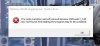
No idea but I had the exact same error message today. I called for support but the only thing that I accomplished was to get so fricken upset at the tech (?), it ruined my day.
It’s a 64 bit program and should not install in thr Programs x86 directory. That’s for 32 bit programs. I would delete the current install and “force” install it in the C:\Program Files directory. The installation routine should give you the option of where to install the program.
No guarantees this will work but it did for thr previous version that always threw a false virus warning.
It’s a 64 bit program and should not install in thr Programs x86 directory. That’s for 32 bit programs. I would delete the current install and “force” install it in the C:\Program Files directory. The installation routine should give you the option of where to install the program.
No guarantees this will work but it did for thr previous version that always threw a false virus warning.
??
Hmmmm....do a file search for that missing DLL file and see if it actually installed. If it was installed then it’s probably in the wrong sub-directory.