


DJI Mavic, Air and Mini Drones
Friendly, Helpful & Knowledgeable Community
Join Us Now

Pro DJI Mini 5 Pro When You Ignore the Power Lines

trisen1981

Well-Known Member
Joined
Dec 26, 2024
Messages
81
Reactions
251
Age
44
Location
Montréal, QC, CAN
Recently had a Real Estate gig - and decided to preplan the mission in advance, rather than operating both stics and a gimbal at the same time (or using POI tracking as an option), with a bottom diving curve.

My drone flew this planned mission straight under and over power lines without blinking.

Sunglasses on. Cigarette lit. Zero respect for obstacles.

Outcome of this example:

Even though obstacle avoidance was set to hover
LIDAR and visual sensors on mini 5 pro - doesn't see cables or small branches at all.


To view this content we will need your consent to set third party cookies.
For more detailed information, see our cookies page.
 
Last edited:
Amazing how powerlines seem to pop up after you've taken off AND they are found in the most unlikely places 👿
Well, I seen those while moving to the first waypoint - but decided to give it a try :) I wish there were dry run option with minimal speed to tesst out the preplanned waypoints and then run on the full speed.
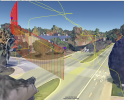
But same time, there is still no warranty it will work next time - wind/ GPS position errors etc
 
I used to use the grid feature on my screen, but I found myself nearly hitting power lines that blended in with the grid.
I don't think there will ever be an avoidance system good enough to see everything all the time.
 
  • Like
Reactions: trisen1981
Well, I seen those while moving to the first waypoint - but decided to give it a try :) I wish there were dry run option with minimal speed to tesst out the preplanned waypoints and then run on the full speed.

But same time, there is still no warranty it will work next time - wind/ GPS position errors etc
Why not just change the global speed setting to a low value for the test run?
 
Why not just change the global speed setting to a low value for the test run?
That will work - but again, GPS error is pretty high without RTK + wind error - so while yes, it is possible to override global speed - but in this particular case, If my dry run was ok - and I saw that wire - then I would not run this at the full speed :)

But yes, you are right - next time I will go with dry run test first with slow speed - make sure there is nothing in 1-2 meters distance from the drone and then run at full speed
 

DJI Drone Deals

New Threads

Forum statistics

Threads
139,569
Messages
1,649,593
Members
167,784
Latest member
AmeliaAir
Want to Remove this Ad? Simply login or create a free account






