DJI Mavic, Air and Mini Drones
Friendly, Helpful & Knowledgeable Community
Join Us Now

File Handling Issue with USB and D-LogM.

YorksPhotos

Well-Known Member
Joined
Jun 14, 2025
Messages
183
Reactions
191
Age
59
Location
California
I have spent a few hours diagnosing this problem. I know what causes it but don't know why and looking for ideas. This also happens on my Mavic 4 Pro using 2 different PC's with Windows 10 and 11. After shooting video in D-LogM when I connect to PC with USB I get this message.
20251128_161357.jpg

There are no issues using quick transfer to my phone. Files play normal and I can then transfer to PC from phone. There is no issue if I haven't recorded anything in D-LogM but once I do it will produce the error. The only fix is to do the format. Once I format using the RC2 Pro to recover I then format with the PC. After that there is no trouble it will connect without error and I can transfer files. When I format I use exFat which I think is the same as using RC2 Pro. I would like to be able to format in the field, I don't take my laptop when traveling. Appreciate any advice.
 
More info:
I deleted the D-Log M file from the library using RC2 Pro. When I connected to USB it still had the request to format. So once it has recorded a D-Log M file it has corrupted the drive but only on a PC. I can still see and play the file on the controller move it to a phone and play it or tranfer to PC⁹. I will test recording to a SD card.
Update: No issues with formatting the SD card from controller with D-LogM. Hooks up with USB and can transfer. For now the workaround is to format the internal storage from a PC. Wierd problem.
 
Last edited:
D-log M is a color space that may or may not require shooting in H.265 codec (depending on resolution). Some machines require a download in able to handle H.265 codec. When you shoot D-log, check the resolution and the codec you are filming with. That may be a part of the problem. It takes a lot of processing power to encode/unencode H.265.
 
The encoding format is not relevant to your problem. The format being talked about is the basic disc format itself. FAT, XFAT both both work. No formats will, like UNIX or any flavor of APPLE.
 
D-log M is a color space that may or may not require shooting in H.265 codec (depending on resolution). Some machines require a download in able to handle H.265 codec. When you shoot D-log, check the resolution and the codec you are filming with. That may be a part of the problem. It takes a lot of processing power to encode/unencode H.265.
Thanks for the reply. It is recording with H.265 4k @60fps. The file itself seems fine. It plays well on 2 PCs and the RC2 Pro, it just makes the onboard SSD unreadable and only if formatted from the controller.

The encoding format is not relevant to your problem. The format being talked about is the basic disc format itself. FAT, XFAT both both work. No formats will, like UNIX or any flavor of APPLE.
Thanks. Agree and XFAT should work. Since the M4P is experiencing the same problem I would think I am not the only one.
 
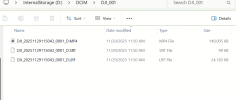
I just shot 5 seconds of D-Log M on my Mavic 4 Pro. I connected directly to my Windows 11 PC and file explorer opened showing me the internal storage without any issues:

1764446266914.png

Are you connecting directly to the PCs or are you using a hub? Try direct if you are using a hub.
Have you tried a different USB cable? I know these are long shot solutions, but having this problem on 2 different computers is a bit of a head scratcher.
 
I just shot 5 seconds of D-Log M on my Mavic 4 Pro. I connected directly to my Windows 11 PC and file explorer opened showing me the internal storage without any issues:

View attachment 186692

Are you connecting directly to the PCs or are you using a hub? Try direct if you are using a hub.
Have you tried a different USB cable? I know these are long shot solutions, but having this problem on 2 different computers is a bit of a head scratcher.
It sure is. No hub, 2 cables on 2 PC'S with 2 windows 2 drones and 2 controllers. I am going to try it on my back up M4P. Thanks for the reply.
 

DJI Drone Deals

New Threads

Forum statistics

Threads
139,523
Messages
1,649,183
Members
167,754
Latest member
jackscottish435
Want to Remove this Ad? Simply login or create a free account