



DJI Mavic, Air and Mini Drones
Friendly, Helpful & Knowledgeable Community
Join Us Now

Map zoom level on RC2 controller

foobar34

Member
Joined
Mar 27, 2019
Messages
8
Reactions
3
I'm having problems zooming into maps with my RC2 controller (app version 1.19.4, the latest)

I'm connected to the internet, I open the waypoint option, I try to zoom into a single house parcel. I cannot zoom beyond a certain level. Using DJI Fly 1.19.4 on my Android phone, I can zoom as much as I want

Here is an example for Green Lake in Seattle, first one is a RC2 screenshot, cannot zoom in anymore., the second a screnshoot on my phone, I could zoom in even further, if I wanted. It looks like they use different map providers, but I don't know how to switch if that's the case

Is there a way to zoom more on the RC2? I'm creating a waypoint mission with very close waypoints and POIs, and it's very hard to do without the proper level of zoom
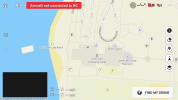
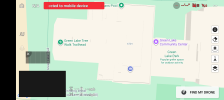
Screenshot_20260201-165437.png

Screenshot_20260201-165555.png
 
I'm having problems zooming into maps with my RC2 controller (app version 1.19.4, the latest)

I'm connected to the internet, I open the waypoint option, I try to zoom into a single house parcel. I cannot zoom beyond a certain level. Using DJI Fly 1.19.4 on my Android phone, I can zoom as much as I want

Here is an example for Green Lake in Seattle, first one is a RC2 screenshot, cannot zoom in anymore., the second a screnshoot on my phone, I could zoom in even further, if I wanted. It looks like they use different map providers, but I don't know how to switch if that's the case

Is there a way to zoom more on the RC2? I'm creating a waypoint mission with very close waypoints and POIs, and it's very hard to do without the proper level of zoom

View attachment 187736

View attachment 187735
You’re spot on about the cause: the DJI RC2 and the DJI Fly app on Android/iOS often pull from different map data sources or have different "zoom ceiling" limits hardcoded into the firmware to save on processing memory.

While there isn't a "switch map provider" button in the settings, there are a few ways to work around this limitation for precision waypoint planning.

Why the Zoom is Restricted
The RC2 uses a customized Android operating system where DJI prioritizes stability over high-res map tiles. To prevent the controller from lagging or crashing while handling both a 4K video feed and complex map data, they often cap the Map Tile Detail Level. In contrast, your phone has significantly more RAM and a more powerful processor, allowing it to cache deeper zoom levels from Mapbox or Google Maps.

Solutions & Workarounds
Offline Maps (The High-Detail Trick): Often, the "live" stream of maps is capped, but Offline Maps can sometimes bypass this.

Connect to high-speed Wi-Fi.

Go to Profile > Offline Maps.

Select your area and zoom in as far as the RC2 allows to download the tiles.

Sometimes, pre-loading these tiles allows the interface to render one level deeper than the "streaming" version.

Plan on Phone, Sync to RC2: Since your phone allows for the precision you need, the most effective workflow is to leverage DJI’s cloud sync:

Open the DJI Fly app on your phone (while logged into the same DJI account).

Create your Waypoint mission with the high-zoom precision you need.

Save the mission. It should automatically sync to the DJI Cloud.

On your RC2, go to the Waypoint library. Tap the Cloud icon to refresh, and your precision-planned mission will appear there, ready to fly.

Use a Mouse for Better Placement: If you find the touch interface on the RC2 makes it even harder to place points at that maximum zoom level, you can plug a USB-C mouse into the bottom of the RC2. It provides a cursor that allows for much finer placement of POIs and waypoints than a thumb.
 
Last edited:
You’re spot on about the cause: the DJI RC2 and the DJI Fly app on Android/iOS often pull from different map data sources or have different "zoom ceiling" limits hardcoded into the firmware to save on processing memory.

While there isn't a "switch map provider" button in the settings, there are a few ways to work around this limitation for precision waypoint planning.

Why the Zoom is Restricted
The RC2 uses a customized Android operating system where DJI prioritizes stability over high-res map tiles. To prevent the controller from lagging or crashing while handling both a 4K video feed and complex map data, they often cap the Map Tile Detail Level. In contrast, your phone has significantly more RAM and a more powerful processor, allowing it to cache deeper zoom levels from Mapbox or Google Maps.

Solutions & Workarounds
Offline Maps (The High-Detail Trick): Often, the "live" stream of maps is capped, but Offline Maps can sometimes bypass this.

Connect to high-speed Wi-Fi.

Go to Profile > Offline Maps.

Select your area and zoom in as far as the RC2 allows to download the tiles.

Sometimes, pre-loading these tiles allows the interface to render one level deeper than the "streaming" version.

Plan on Phone, Sync to RC2: Since your phone allows for the precision you need, the most effective workflow is to leverage DJI’s cloud sync:

Open the DJI Fly app on your phone (while logged into the same DJI account).

Create your Waypoint mission with the high-zoom precision you need.

Save the mission. It should automatically sync to the DJI Cloud.

On your RC2, go to the Waypoint library. Tap the Cloud icon to refresh, and your precision-planned mission will appear there, ready to fly.

Use a Mouse for Better Placement: If you find the touch interface on the RC2 makes it even harder to place points at that maximum zoom level, you can plug a USB-C mouse into the bottom of the RC2. It provides a cursor that allows for much finer placement of POIs and waypoints than a thumb.

Third-Party KMZ Import: For professional-grade precision (single house parcels), many pilots use Google Earth Pro on a PC to create a path, export it as a .KMZ file, and then manually move that file into the RC2's internal storage: Internal Storage > Android > data > dji.go.v5 > files > waypoint
Great set of workarounds and solutions.
However, the DJI iCloud sync option no longer exists in the U.S..
 
  • Haha
Reactions: BossBob
if your going to use a mouse on it then use a g604 or a basilisk v3 x or similar, as you cant change setting on the controller but you can on those mouse else the sensitivity will be low. also try waypointmap.com and do the planning on your pc and just move the file to the controller.
 
Third-Party KMZ Import: For professional-grade precision (single house parcels), many pilots use Google Earth Pro on a PC to create a path, export it as a .KMZ file, and then manually move that file into the RC2's internal storage: Internal Storage > Android > data > dji.go.v5 > files > waypoint
Where did you get this from? It looks like AI Slop.

A Google Earth Pro KMZ file is not the same as a DJI KMZ file. Google Earth Pro stores compressed KML data in a KMZ file. A DJI KMZ file stores compressed WPML data in their KMZ file. Those two formats are not interchangeable. If you load a Google Earth Pro KMZ file into DJI Fly, you won't see any waypoints. It will appear as an "empty" waypoint mission.
 
Where did you get this from? It looks like AI Slop.

A Google Earth Pro KMZ file is not the same as a DJI KMZ file. Google Earth Pro stores compressed KML data in a KMZ file. A DJI KMZ file stores compressed WPML data in their KMZ file. Those two formats are not interchangeable. If you load a Google Earth Pro KMZ file into DJI Fly, you won't see any waypoints. It will appear as an "empty" waypoint mission.
lol i was getting ready for work and i gave it to Gemini to format as i was using voice type and it tends to skip punctuation, and it seems to have added an example so totally my fault for not checking, but i was running late. i just went and asked the instance why it added that, and it got it somewhere and said it needs to be converted and it could work maybe, but i wouldn't do it that way it would be a waste of time and not something i would advise others to do, would be easier to use waypoint map or litchi i believe, but i haven't used it yet, you would know more about that then me.
 
Last edited:
Solutions & Workarounds
Offline Maps (The High-Detail Trick): Often, the "live" stream of maps is capped, but Offline Maps can sometimes bypass this.

Connect to high-speed Wi-Fi.

Go to Profile > Offline Maps.

Select your area and zoom in as far as the RC2 allows to download the tiles.

Sometimes, pre-loading these tiles allows the interface to render one level deeper than the "streaming" version.

Plan on Phone, Sync to RC2: Since your phone allows for the precision you need, the most effective workflow is to leverage DJI’s cloud sync:

Open the DJI Fly app on your phone (while logged into the same DJI account).

Create your Waypoint mission with the high-zoom precision you need.

Save the mission. It should automatically sync to the DJI Cloud.

On your RC2, go to the Waypoint library. Tap the Cloud icon to refresh, and your precision-planned mission will appear there, ready to fly.
First of all, thanks everyone who answered and provided workarounds

Alas, offline maps at least in my case do not change the maximum zoom level. I tried both offline with no data and being online, and the limit is the same

And, at least for me, the DJI Cloud doesn't work (possibly disabled for US users).

I can transfer manually copying the KMZ file between devices (and changing the long GUID string), but it's a hassle. I also used the litchiutilities to convert back and forth from Litchi. Still, pretty annoying being in the field and having to live with no zoom

Incidentally, I was super annoyed that DJI Fly didn't seem to provide an easy way to edit waypoints without having the drone connected (and many forums stated so as well). It turns out that all you have to do is to go into Connection Guide, tap the top left "camera view" and that lets you enter the mapping portion and waypoints even without the drone connected. I didn't think that "camera view" worked with no drone (hence no camera)

So I can now at least power on both my phone and RC2, and move files back and forth
 
  • Like
Reactions: Nexus Dragoon
You’re spot on about the cause: the DJI RC2 and the DJI Fly app on Android/iOS often pull from different map data sources or have different "zoom ceiling" limits hardcoded into the firmware to save on processing memory.

While there isn't a "switch map provider" button in the settings, there are a few ways to work around this limitation for precision waypoint planning.

Why the Zoom is Restricted
The RC2 uses a customized Android operating system where DJI prioritizes stability over high-res map tiles. To prevent the controller from lagging or crashing while handling both a 4K video feed and complex map data, they often cap the Map Tile Detail Level. In contrast, your phone has significantly more RAM and a more powerful processor, allowing it to cache deeper zoom levels from Mapbox or Google Maps.

Solutions & Workarounds
Offline Maps (The High-Detail Trick): Often, the "live" stream of maps is capped, but Offline Maps can sometimes bypass this.

Connect to high-speed Wi-Fi.

Go to Profile > Offline Maps.

Select your area and zoom in as far as the RC2 allows to download the tiles.

Sometimes, pre-loading these tiles allows the interface to render one level deeper than the "streaming" version.

Plan on Phone, Sync to RC2: Since your phone allows for the precision you need, the most effective workflow is to leverage DJI’s cloud sync:

Open the DJI Fly app on your phone (while logged into the same DJI account).

Create your Waypoint mission with the high-zoom precision you need.

Save the mission. It should automatically sync to the DJI Cloud.

On your RC2, go to the Waypoint library. Tap the Cloud icon to refresh, and your precision-planned mission will appear there, ready to fly.

Use a Mouse for Better Placement: If you find the touch interface on the RC2 makes it even harder to place points at that maximum zoom level, you can plug a USB-C mouse into the bottom of the RC2. It provides a cursor that allows for much finer placement of POIs and waypoints than a thumb.
Terrific feedback!!! Thanx so much.
 
  • Like
Reactions: Nexus Dragoon

DJI Drone Deals

New Threads

Forum statistics

Threads
140,224
Messages
1,656,800
Members
168,234
Latest member
Ufnfkfnerwe265
Want to Remove this Ad? Simply login or create a free account







