DJI Mavic, Air and Mini Drones
Friendly, Helpful & Knowledgeable Community
Join Us Now

3 Sunstar sunset over creek

Chrislaf

Well-Known Member
Joined
Oct 16, 2019
Messages
1,202
Reactions
1,377
Age
63
Location
ON, Canada
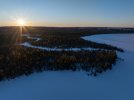
Here's a sunset taken with my Mavic 3 Pro a couple of nights ago over a frozen creek. The temperature during shooting was between -8ºC to -11ºC. Thankfully I had my transmitter mitt to keep my hands from getting too cold.

Chris
M3_Pro-2831-Edit.jpg

24mm, 1/320s @ f/8

 
Awesome photo!
 
  • Like
Reactions: sarahb and Chrislaf
Thanks.

Chris
 
Here's a sunset taken with my Mavic 3 Pro a couple of nights ago over a frozen creek. The temperature during shooting was between -8ºC to -11ºC. Thankfully I had my transmitter mitt to keep my hands from getting too cold.

Chris

View attachment 187751

24mm, 1/320s @ f/8
I can feel the cold just by looking at the photo, brrrrr. Nice photo though. F8 has created very nice sunstar.
 
  • Like
Reactions: Chrislaf
Thanks.

I experimented with a number of aperatures all the way down to f11 and using HDR shots (to increase dynamic range). Ultimately the best shot of the evening was the second one of a 5 shot AEB set. I was trying to get a sharp sunstar, while reducing lens flare and get a good composition all while trying to do this quickly enough so that my fingers and the rest of me did not get too cold.

I don't have any intentions to update to the Mavic 4 Pro since I don't have enough scenic areas to justify the upgrade, but I have to wonder if the improvements in the wide camera would make the sunstars even more defined for a similar shot.

Chris
 
Thanks.

I experimented with a number of aperatures all the way down to f11 and using HDR shots (to increase dynamic range). Ultimately the best shot of the evening was the second one of a 5 shot AEB set. I was trying to get a sharp sunstar, while reducing lens flare and get a good composition all while trying to do this quickly enough so that my fingers and the rest of me did not get too cold.

I don't have any intentions to update to the Mavic 4 Pro since I don't have enough scenic areas to justify the upgrade, but I have to wonder if the improvements in the wide camera would make the sunstars even more defined for a similar shot.

Chris
Firstly I do not think that the improved camera on M4P would make the sunstar look any better. Aperture is mostly responsible for nice sunstar and you used f8 wisely to achieve that effect. For wast landscape shots I personally prefer 24mm over 28mm. So by upgrading to M4P you would loose fair bit of field of view. Anyway, your photo is very nice with good composition too. If it was mine I would probably bring more of the ground detail out which would also bring out more of the color and definition in the tree tops. But that's just me and I respect your way of presenting this lovely photo.
 
Last edited:
  • Like
Reactions: Chrislaf
Thanks for the tips. I do appreciate them. I might try a bit more editing in photoshop. I’m not a photoshop expert and I tend to like to preserve the natural look of the original scene rather than making it into something it wasn’t but if you want to have a go at the image I can share the original DNG from my Google drive.

Chris
 
  • Like
Reactions: Filmarik
Yeah
Thanks for the tips. I do appreciate them. I might try a bit more editing in photoshop. I’m not a photoshop expert and I tend to like to preserve the natural look of the original scene rather than making it into something it wasn’t but if you want to have a go at the image I can share the original DNG from my Google drive.

Chris
Yeah, I will give it a go, no problem.😀
You can send me the link via private message if you'd prefer to do it that way
 
  • Like
Reactions: Chrislaf
Here's a sunset taken with my Mavic 3 Pro a couple of nights ago over a frozen creek. The temperature during shooting was between -8ºC to -11ºC. Thankfully I had my transmitter mitt to keep my hands from getting too cold.

Chris

View attachment 187751

24mm, 1/320s @ f/8
Beautiful image Chris. I really feel the cold.
Dale
 
Thanks Dale.

Chris
Chris:

After leaving the Forum alone for the day, I came back and saw some comments about Photoshop. With your permission, I have worked on this great image to make it even better. If ok with you, I will send my version. I am somewhat of a fan and longtime use of Photoshop. I got amazing results which I think you will like it . I am now asking permission, as per some critics on the forum.

Dale
 
Sure, if you want to give it a go I don’t mind. I can share the original DNG which is very underexposed as it was part of a 5 shot AEB set. Another forum member did some edits as well on the original.

I tend to edit my images to try to reflect what the original scene looked like when I shot it.

Chris
 
Sure, if you want to give it a go I don’t mind. I can share the original DNG which is very underexposed as it was part of a 5 shot AEB set. Another forum member did some edits as well on the original.

I tend to edit my images to try to reflect what the original scene looked like when I shot it.

Chris
The original DNGs are usually too much MB to e-mail. This is what I got. Used Adobe Masking tool in Camera RAW, increased exposure shadows in the forest, increased snow exposure, using a different mask for each section of the image. Double cilck to see full screen. Chrislaf phot original copy.jpg


Chrislaf photo Photoshop masking.jpg
 
Dale, thank you for taking the time to work on my image. I do appreciate it and I am amazed at what can be done in Photoshop to highlight different aspects of an image. Both you and Filmarik worked on my image and made similar edits which I do value and ultimately learn from.

My goal when I photograph these scenes is to capture a photo (other than the sunstar) that looks as much as possible like what I can see with my eyes, so when I edit, I edit with that goal in mind.

Chris
 
Dale, thank you for taking the time to work on my image. I do appreciate it and I am amazed at what can be done in Photoshop to highlight different aspects of an image. Both you and Filmarik worked on my image and made similar edits which I do value and ultimately learn from.

My goal when I photograph these scenes is to capture a photo (other than the sunstar) that looks as much as possible like what I can see with my eyes, so when I edit, I edit with that goal in mind.

Chris
Chris

Of course your goal of capturing the image as is it. That is a goal we all share. The problem is that the camera lens cannot see (adjust instantly to different lighting) as well as the human eye, and these drone images almost always suffer from a high dynamic range, with the sensor reading the sky and leaving the foreground in the dark. Up until Adobe teechnicians developed the masking tool, we had to adjust with other tools such as the burning or the dodging tool. Now, we can mask any and all parts of the image and work on that layer only. That is what I did. I started with the sky mask, then, the trees, and finally the snow. I was shocked to see the tips of the trees light up so beautifully. Most of the photo softwares now have a version of isolated masking.

Dale
 

DJI Drone Deals

New Threads

Members online

Forum statistics

Threads
140,236
Messages
1,656,970
Members
168,239
Latest member
OldGitRay
Want to Remove this Ad? Simply login or create a free account