DJI Mavic, Air and Mini Drones
Friendly, Helpful & Knowledgeable Community
Join Us Now

Mini Told to Post This Here

  • Thread starter Thread starter Deleted member 150517
  • Start date Start date
Glad to see you back @TheSnowyPilot. My curiosity is piqued as to who this "certain somebody" could be...
 
Last edited:
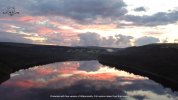
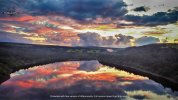
The outbreak of Covid here leaves me with too much time on my hands so I thought I'd spend a few moments trying to keep some of my Photoshop skills alive. I wasn't sure how much to open up the tree detail. the sky and reflection is gorgeous. Hope I didn't step on your toes Snowy.

1643054250318.png
 
That looks amazing.
Thank you.
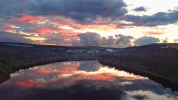
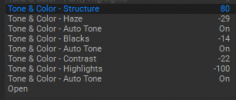
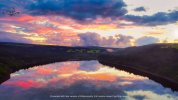
Again, I've just been playing around killing time and did the above photo in Photoshop using masking of the sky and water. While it didn't take me long I wanted to check out what I could do in the program On 1 Raw 2022. Below is that rendition which took all of 8 clicks, nothing more! I'm sure Dale Davis will show up shortly :).

Did you happen to take the same shot with a lighter exposure by chance that can be layered on top? This image is really great and is worth some TLC.

1643060518212.png

1643060438748.png
 
Thank you.
Again, I've just been playing around killing time and did the above photo in Photoshop using masking of the sky and water. While it didn't take me long I wanted to check out what I could do in the program On 1 Raw 2022. Below is that rendition which took all of 8 clicks, nothing more! I'm sure Dale Davis will show up shortly :).

Did you happen to take the same shot with a lighter exposure by chance that can be layered on top? This image is really great and is worth some TLC.

View attachment 142598

View attachment 142597
Not sure I did but I can get back to you on that one when I get home later.
 
Not sure I did but I can get back to you on that one when I get home later.
If you have another frame with a lighter exposure from identically the same place the image can be made even better by layering them. Was this from a RAW file converted to jpg?
 
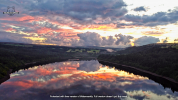
Okay, I had to have a little play with your photo in Photoshop too. Hope you don't mind. It's a lovely image.
Nice job. I would have liked to have taken the shadow area up further, but as I can see it increased the noise significantly in some areas which is why I kept those areas darker than I would have liked. I asked the OP if he had a lighter exposure or a raw image. As you said, it is a lovely image.
 
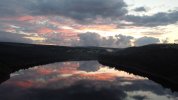
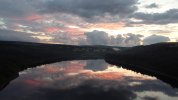
As promised, not sure if these are of any use but they were the two taken directly after the one I sent, no difference in exposures. Maybe a little variation in angle but not sure since these were taken in August.
Thank you.
Again, I've just been playing around killing time and did the above photo in Photoshop using masking of the sky and water. While it didn't take me long I wanted to check out what I could do in the program On 1 Raw 2022. Below is that rendition which took all of 8 clicks, nothing more! I'm sure Dale Davis will show up shortly :).

Did you happen to take the same shot with a lighter exposure by chance that can be layered on top? This image is really great and is worth some TLC.

View attachment 142598

View attachment 142597
 

Attachments

  • DJI_0783.JPG
    DJI_0783.JPG
    4.1 MB · Views: 8
  • DJI_0784.JPG
    DJI_0784.JPG
    4.2 MB · Views: 8
As promised, not sure if these are of any use but they were the two taken directly after the one I sent, no difference in exposures. Maybe a little variation in angle but not sure since these were taken in August.
Not enough difference in exposure to really make any difference. When photographing scenes that have very bright and very dark subject matter in the same scene, if the camera doesn't have an HDR mode where it automatically shoots multiple images at different exposures, the best thing to do is shoot several images from the same exact position, from 1-2 stops under exposed to 1-2 stops over exposed. Then you have the ability to super-impose (layer) them on top of one another and mask or erase the unwanted parts from each layer leaving the sections of each layer that are best exposed. Some programs, maybe even the cameras automatically blend the images in HDR modes. I tend to do it manually so I'm not all that familiar with cameras that do the auto blending in HDR modes. I'm sure others on the forum can address that.
 
Not enough difference in exposure to really make any difference. When photographing scenes that have very bright and very dark subject matter in the same scene, if the camera doesn't have an HDR mode where it automatically shoots multiple images at different exposures, the best thing to do is shoot several images from the same exact position, from 1-2 stops under exposed to 1-2 stops over exposed. Then you have the ability to super-impose (layer) them on top of one another and mask or erase the unwanted parts from each layer leaving the sections of each layer that are best exposed. Some programs, maybe even the cameras automatically blend the images in HDR modes. I tend to do it manually so I'm not all that familiar with cameras that do the auto blending in HDR modes. I'm sure others on the forum can address that.
It was originally taken on a Mini and I had no idea you could edit exposure at the time.
 

DJI Drone Deals

New Threads

Forum statistics

Threads
140,238
Messages
1,656,984
Members
168,239
Latest member
OldGitRay
Want to Remove this Ad? Simply login or create a free account