In my rush to firmware update my dji stuff last month, I never noticed if there was a firmware download for the batteries, did anyone? I dont remember seeing it popup.
Does it download to each battery individually or to the m5p only?
You do it thru the Assistant software on your PC. Go to the DJI site and get the appropriate assistant, I think assistant 2 and then plug the drone into the pc it should show needed updates, if not simply find the update and install.
Each battery needs to be updated. Turn off RC2 and device, put battery in device, turn on RC2 then update firmware; repeat for each battery. Doing this for the A3S and RC2 at this time, Next I'll do it for the RC 2 Pro and Mavic 4 Pro (assuming it also needs it); both have 5 batteries.
Update: Mavic 4 Pro updates needed and in progress. All done now.
Thanks to Flyin&Smilin for being vigilant and makes this known. Have no idea what the battery firmware update does but expect it does something better now.
What are you talking about?? Assistant 2 dont support m5p.
Also what are you talking about battery message while updating firmware? None was ever displayed on mine on rc2 ever. Back to square 1 on my topic, it was flooded with confusion and more false info.
What are you talking about?? Assistant 2 dont support m5p.
Also what are you talking about battery message while updating firmware? None was ever displayed on mine on rc2 ever. Back to square 1 on my topic, it was flooded with confusion and more false info.
What has been said here by several people is correct. What's more, most of these people are have years of experience, so deserve some respect.
DJI updates battery firmware occasionally, and when they do, each battery must be put in drone after the full drone firmware update to get the battery firmware up to date. If out of date, Fly will show the message, "Inconsistent Firmware", will still fly as normal without updating, but there may be some deficiencies to things like RTH, displayed remaining flight time, etc.
What are you talking about?? Assistant 2 dont support m5p.
Also what are you talking about battery message while updating firmware? None was ever displayed on mine on rc2 ever. Back to square 1 on my topic, it was flooded with confusion and more false info.
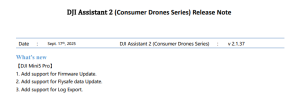
Strange. I have connected my M5P to my PC running DJI Assistant 2 (consumer drone series) and checked for updates. Nothing as comprehensive as the original (and hackable) Assistant 2 which I used with my Mavic but certainly usable for updates!
You seem to be a bit irritated that you receive advice. sorry for the confusion. If my answer confused you into anger feel free to use the ignore feature.
I said "I think" I wasnt for sure, We cannot hold your hand, we can only offer advice..It may be wrong, but its a direction you can take in your research of the problem, and I think I answered the question as best I could. Perhaps google A.I. would be more suitable for you, I guess I got it wrong, It happens. Please refrain from trolling the very group that only tried to help you.
Why don't you simply go to the DJI site and look for Battery firmware updates Yourself.....Download them to a folder, and install them thru other software instead of DJI's?
Strange. I have connected my M5P to my PC running DJI Assistant 2 (consumer drone series) and checked for updates. Nothing as comprehensive as the original (and hackable) Assistant 2 which I used with my Mavic but certainly usable for updates!