


DJI Mavic, Air and Mini Drones
Friendly, Helpful & Knowledgeable Community
Join Us Now

Cannot get the DJI RC Pro 2 to work

Paul Harvey

Well-Known Member
Premium Pilot
Joined
Aug 29, 2021
Messages
236
Reactions
151
Age
71
Location
Tucson, AZ
I hope this the correct forum.

I just got the above controller but can't get it to connect to my Air 3S. I got on WiFi easy enough, but when it asked for the time zone, there were none available in any english-speaking language. They were all in Asia (I think)(please see the attached images). After that, nothing worked. Not my password, email, or the "capta" thing.

Every time I try I am told one of those is wrong and it varies between the three. I tried changing my password several times with zero results.

Also, the thing isn't charging. I left it plugged in for over 6 hours and it never moved higher than two green lights. I was only able to try to connect because it came that way (two lights).
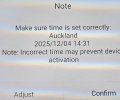
controller1.jpgcontroller2.jpg

I need help, thanks!
 
Paul:
I can’t help but think the controller is defective. I just sent back a DJI Smart controller just purchased from a seller on eBay as it had defective sound and the installed dji Go4 was not connecting (similar to yours).
I would return it.
 
  • Like
Reactions: Paul Harvey
I hope this the correct forum.

I just got the above controller but can't get it to connect to my Air 3S. I got on WiFi easy enough, but when it asked for the time zone, there were none available in any english-speaking language. They were all in Asia (I think)(please see the attached images). After that, nothing worked. Not my password, email, or the "capta" thing.

Every time I try I am told one of those is wrong and it varies between the three. I tried changing my password several times with zero results.

Also, the thing isn't charging. I left it plugged in for over 6 hours and it never moved higher than two green lights. I was only able to try to connect because it came that way (two lights).
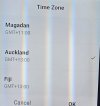
View attachment 186781View attachment 186782

I need help, thanks!
I found I had to scroll up (not the intuitive down) to find the NA-based time zones (assuming you're writing from NA).
Don't know about the charging. I found Gemini and ChatGPT to be indispensable in getting mine set up.
 
Chat GTP said that a common issue is:
  • Missing English options: Sometimes the list defaults to Asian regions. Scroll upward (not downward) to reveal North America/Europe zones.
  • Controller not charging: Ensure you’re using a 65W PD USB-C charger; low-power chargers may prevent proper setup.
  • Firmware updates: If language/time zone options don’t appear, update both drone and controller firmware via DJI Fly.
 
Is your USB charger up to the task. the RC requires 65w fast protocol charger. Older, less powerful won't do the job
That was one of the major problems. After plugging it into a 65w charger, it started charging, yay!

The second major problem was I couldn't connect to my A3s. It seems choosing the wrong time zone "may" screw the thing up. Well, my time zone wasn't even in the list, so I had no choice but to choose one of the other ones. And from then on nothing worked.

So I launched DJI Assistant 2 and was told I needed to update, so I did. But when I went back to DJI Fly, all the correct time zones were there! So I chose mine and everything went smoothly.

I flew with it today 'til I drained all three batteries.

Thank you all for your help!
 
Try: [Enter Settings > System > Reset options > Erase all data(factory reset)]

The settings are accessed by swiping down twice from the top of the screen.
Here's a quick video that show the steps (the steps are the same for the RC Pro 2):
To view this content we will need your consent to set third party cookies.
For more detailed information, see our cookies page.
 
Do you have to unbind your old controller first on your Air3s. I want to get one too for my Air3s. But I’m not sure of how you change controllers Now that you flew 3 batteries of flying with it was it nice to use.
 
  • Like
Reactions: Paul Harvey
Do you have to unbind your old controller first on your Air3s. I want to get one too for my Air3s. But I’m not sure of how you change controllers Now that you flew 3 batteries of flying with it was it nice to use.
No, you don't have to do anything with the old controller. And yes, it is nice! Larger screen, extra buttons, yay! Only one little niggle: The screen isn't as readable in bright sunlight as most reviewers would have you believe. It's a helluva lot better though. Still worth it.
 

DJI Drone Deals

New Threads

Members online

Forum statistics

Threads
139,642
Messages
1,650,323
Members
167,845
Latest member
highflyer314
Want to Remove this Ad? Simply login or create a free account






