DJI Mavic, Air and Mini Drones
Friendly, Helpful & Knowledgeable Community
Join Us Now

controller screen glare

Captain Spock

Well-Known Member
Joined
Sep 28, 2022
Messages
154
Reactions
89
Age
75
Location
Placitas, New Mexico, USA
I fly a mini2 with an RC1 controller using an iPhone or a SkyTreat/ipad combo. I've tried both Drone Mask and Drone Hood to reduce glare. I am thinking of upgrading my drone and controller to a mini 4 or 5 with an RC2. How does the RC2 perform with respect to glare? Is the RC2 touch screen? If so, is using the built-in screen clumsy? ANy opinions appreciated
Thanks in advance . . .
 
I fly a mini2 with an RC1 controller using an iPhone or a SkyTreat/ipad combo. I've tried both Drone Mask and Drone Hood to reduce glare. I am thinking of upgrading my drone and controller to a mini 4 or 5 with an RC2. How does the RC2 perform with respect to glare? Is the RC2 touch screen? If so, is using the built-in screen clumsy? ANy opinions appreciated
Thanks in advance . . .


The RC2 has a touch screen.

A smooth, planar surface like the display screen on a controller is going to be reflective. Thus, depending on its orientation and whether or not it's shielded in some manner, you may be obliged to look at a reflection of your own face or of a bright sky. And, of course, if ambient light is brighter than the backlight of the display, then the image on the screen may be washed out.

I don't know its brand-name, because there are several identical products marketed under different monikers, but I chose a stretchy black rubber hood for my RC2 -- about $12, if memory serves. It fits perfectly and takes only a few seconds to slip on (before attaching control sticks and raising the antennas, obviously) and sliding off. It does a good job of shielding the display on three sides, and all pertinent data are readily visible on the screen. My only beef, and it's a minor one, is that it conforms pretty tightly to the edge of the display, so it can be a bit hard for a fat finger to quickly access the menu icon (three dots) in the upper right corner of the screen.

Before buying this, I tried one of those hinged, rigid-plastic folding nightmares. I think the stretchy one does a much better job of staying in place and shielding the display screen from extraneous light. In short, it works, and it's a lot less fussy. At first, I was afraid that stretching it past its elastic limits might cause it to tear, but after more than a year of use, it's proved to be very forgiving and durable.
 

Attachments

  • IMG_1673.JPG
    IMG_1673.JPG
    654.5 KB · Views: 20
  • Like
Reactions: EricJT and Rchawks
@hank970 Thanks for the info. In your image, I see the rubber coating on the RC2, but I don't see any cover or shades for reducing light on the screen. Most all of the shades on the web are plastic clip-ons which unfold ("nightmare") as you said.

The most effective shades I have used were:
- Hoodman: near total dark; elastic slot to access touch screen; iPad; heavy; must look down to reduce weight load; putting on and off to double-check reality cumbersome.
- Drone Mask: good dark; heavy; iphone; elastic entry for touch screen cumbersome; hard on the nose; back of neck strap tends to slip up; easy to double-check reality and put back on.

For anyone who wears eyeglasses: gotta be real careful when putting on and taking off these two. Glasses could come off when you remove the shade. Also, as your eyes are a lot closer to the screen, you may need close-up eyeglasses. I have double vision and getting the prism right in the prescription requires a low-vision optometrist who you can persuade ("You wanna do WHAT?") I was luck that my doctor was just getting nto drones. :-)
 
  • Like
Reactions: Rchawks
@hank970 Thanks for the info. In your image, I see the rubber coating on the RC2, but I don't see any cover or shades for reducing light on the screen. Most all of the shades on the web are plastic clip-ons which unfold ("nightmare") as you said.

The most effective shades I have used were:
- Hoodman: near total dark; elastic slot to access touch screen; iPad; heavy; must look down to reduce weight load; putting on and off to double-check reality cumbersome.
- Drone Mask: good dark; heavy; iphone; elastic entry for touch screen cumbersome; hard on the nose; back of neck strap tends to slip up; easy to double-check reality and put back on.

For anyone who wears eyeglasses: gotta be real careful when putting on and taking off these two. Glasses could come off when you remove the shade. Also, as your eyes are a lot closer to the screen, you may need close-up eyeglasses. I have double vision and getting the prism right in the prescription requires a low-vision optometrist who you can persuade ("You wanna do WHAT?") I was luck that my doctor was just getting nto drones. :-)

Look again. It's hard to see in my photo, but the hood projects about 2.5 inches above the screen on the top and both sides. Not a tunnel like the Hoodman, but more than adequate to provide shade, and less pricey.
 
As long as I’m not in direct sunlight the RC2 isn’t a problem for me to see. I try to find a tree or wall to cast a shadow to help with that. I do have one of those flip up covers on my RC2 which is a bit of a pain to work around and without side covers doesn’t help that much with the light issue. But on the other hand it does provide protection for the screen itself while setting things up, drone landing pad, ect. I use a lanyard as well so I can safely carry it while walking or flying. I have a Hoodman for my MA2 and for shutting out light it can’t be beat. But as stated it can be awkward to use and handle but works great with my iPad mini. In the summer a iPhone or iPad gets hot much faster than the RC2.
 
@hank970: aha! got it. would you post a photo that shows the height of the hood? Also how easy is it to touchscreen with the hood in place?
@Rchawks: TY4 your reply. I had not considered the heat aspects
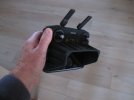
I hope this helps. All controls are readily accessible with the hood in place, but the hood is very close to the menu button in the extreme top right corner of the screen. Not a problem for me.

As you can see, the hood fits like a glove.
 

Attachments

  • IMG_1764.JPG
    IMG_1764.JPG
    1.1 MB · Views: 7
I fly a mini2 with an RC1 controller using an iPhone or a SkyTreat/ipad combo. I've tried both Drone Mask and Drone Hood to reduce glare. I am thinking of upgrading my drone and controller to a mini 4 or 5 with an RC2. How does the RC2 perform with respect to glare? Is the RC2 touch screen? If so, is using the built-in screen clumsy? ANy opinions appreciated
Thanks in advance . . .
 
  • Like
Reactions: Rchawks
I hope this helps. All controls are readily accessible with the hood in place, but the hood is very close to the menu button in the extreme top right corner of the screen. Not a problem for me.

As you can see, the hood fits like a glove.
@hank970 Bingo! I get it! Do you recall where you got it, what name it is called?
 
I hope this helps. All controls are readily accessible with the hood in place, but the hood is very close to the menu button in the extreme top right corner of the screen. Not a problem for me.

As you can see, the hood fits like a glove.
I have this type of hood on my SC....I have had it for 7 years and it has been a great investment.
 

DJI Drone Deals

New Threads

Members online

Forum statistics

Threads
140,106
Messages
1,655,500
Members
168,161
Latest member
Air Duderino
Want to Remove this Ad? Simply login or create a free account