


When in pano mode before shutter is started I am unable to to focus like a single shot. Pressing on the screen does nothing. Does anyone know how to focus when in pano mode?

You are using an out of date browser. It may not display this or other websites correctly.
You should upgrade or use an alternative browser.
You should upgrade or use an alternative browser.
Focus Mavic4 pro on pano
- Thread starter slowhand515
- Start date


Dan'sUavTech
Well-Known Member
I would help, but I'm afraid I don't have a Mavic 4 Pro, so don't know. Hopefully someone else chimes in!
Dan thank you...hopefully someone has gone down that road. Fyi...this specific drone is running the newest .500 firmware...erle
@Bussty is our resident expert on this issue.When in pano mode before shutter is started I am unable to to focus like a single shot. Pressing on the screen does nothing. Does anyone know how to focus when in pano mode?
Hopefully, he sees this post and can reply.
Focusing shouldn't be an issue.When in pano mode before shutter is started I am unable to to focus like a single shot. Pressing on the screen does nothing. Does anyone know how to focus when in pano mode?
Is there a reason you wouldn't use autofocus?
It works perfectly for me whether shooting single frames or panoramas.


Bussty
Well-Known Member
I used to get all twisted about this but in practice has made no material difference, in the Pano modes the MP4 appears to be fixed focus and it just works
Focusing shouldn't be an issue.
Is there a reason you wouldn't use autofocus?
It works perfectly for me whether shooting single frames or panoramas.
I'm unable to use autofocus in pano, If you have a mavic 4 you might confirm that. I would have used autofocus if available. Seems like the 4 only focuses in infinity automatically.
Are you getting images that aren't properly focussed?I'm unable to use autofocus in pano, If you have a mavic 4 you might confirm that. I would have used autofocus if available. Seems like the 4 only focuses in infinity automatically.
Fun fact ... you can shoot panoramas all by yourself without using some lame automated feature.
It gives you a lot more creative control.

I do all of my panoramas manually. I use the grid, and overlap by 30% for each shot for a total of shots needed to cover 180 degrees. E.g.: I shoot each image manually, and therefore, I can tap the screen to focus before each shot.When in pano mode before shutter is started I am unable to to focus like a single shot. Pressing on the screen does nothing. Does anyone know how to focus when in pano mode?
To process, I also do it manually in either Photoshop or Lightroom. (file>Photomerge to panorama) I have laid out those steps in prior posts but if you want them again, please request.
Focusing shouldn't be an issue.
Is there a reason you wouldn't use autofocus?
It works perfectly for me whether shooting single frames or panoramas.
Wow which cities are those?
What was the shutter speed and ISO?
Was it using the built-in pano modes or manually shooting each shot, long exposures for each shot?
Here is a sunset shot of 15 image pano of Miami. (I have previously submitted this, but it seems to be useful for this posting). This was shot manually with 30% overlap and processed in Photoshop . I almost never use the automated image from the drone. I only focused the first shot. (click on image for full screen).Wow which cities are those?
What was the shutter speed and ISO?
Was it using the built-in pano modes or manually shooting each shot, long exposures for each shot?
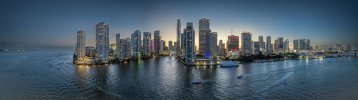
Here is a sunset shot of 15 image pano of Miami. (I have previously submitted this, but it seems to be useful for this posting). This was shot manually with 30% overlap and processed in Photoshop . I almost never use the automated image from the drone. I only focused the first shot. (click on image for full screen).
View attachment 187576
Nice!
You use a grid for the 30% overlap?
You can really see the noise if you zoom in but obviously wasn't a real long exposure so the ISO must have been high.
The main thing I like about the auto pano modes is that it puts all the individual DNGs into each folder so when I do batch processing later, it's easy to select all the images for stitching in Lightroom.
It's especially tricky when I do a 360 pano and a lot of the shots are entirely sky or water.
I used a grid. I did 30% overlaps manually, which required 15 images. Mavic 3 at f/2.8 , Exposure was ISO 500, 1/13th shutter. I cannot recall if I used Topaz De Noise AI.Nice!
You use a grid for the 30% overlap?
You can really see the noise if you zoom in but obviously wasn't a real long exposure so the ISO must have been high.
The main thing I like about the auto pano modes is that it puts all the individual DNGs into each folder so when I do batch processing later, it's easy to select all the images for stitching in Lightroom.
It's especially tricky when I do a 360 pano and a lot of the shots are entirely sky or water.
Dale
I’m probably going to start shooting vertically with the gimbal on portrait. Thank you all for the comments and suggestions. Keep soaring and shooting….Cheers, Erle
I have been shooting all panos vertically for a long time. Even hand held without a tripod. You have the advantage of more foreground, and more sky but you have to compensate for the high dynamic range from the sky to the foreground which is very easy with today's masking tools in Photoshop/Lightroom . This allows me to edit each part of the image independently.I’m probably going to start shooting vertically with the gimbal on portrait. Thank you all for the comments and suggestions. Keep soaring and shooting….Cheers, Erle
Dale
I have been flying drones for 11 years, my current stable is a M2P, Inspire 2/zenmuse x7, and last week an new M4P. I have been shooting panos manually with a grid for years. My MP2 focuses on panos (in pano mode) perfectly, i was just shocked the MP4 didn't allow pano focus in pano mode. I'll probably fiddle with manual portrait 100mp on the new Mp4 using a grid and stitching in Photoshop like I've previously done. Thanks and keep soaring...erleI have been shooting all panos vertically for a long time. Even hand held without a tripod. You have the advantage of more foreground, and more sky but you have to compensate for the high dynamic range from the sky to the foreground which is very easy with today's masking tools in Photoshop/Lightroom . This allows me to edit each part of the image independently.
Dale
Are you sure it doesn't autofocus?i was just shocked the MP4 didn't allow pano focus in pano mode.
Is it giving results that aren't in focus?
With the huge depth of field, it would be an uncommon panorama composition that needed precise focus anyway.
Do some comparison testing.I'll probably fiddle with manual portrait 100mp on the new Mp4 using a grid and stitching in Photoshop like I've previously done. Thanks and keep soaring...erle
I quickly abandoned the 100MP mode and high MP on the other cameras because they just give a bloated filesize but no appreciable image improvements.
That's not something you need when you are shooting large panoramas.
I
I've only had it for a few days...i did some comparison shots between the 25mp and 100mp. I was unimpressed with the 100 mb images in the light I tested it, like yourself. I discerned more CA chromatic aberration in the 100mb files. I think under more light sunlight color temp 6400degrees the 100mb may perform better with less CA under the optimal conditions...The 100mb isn't a true 100mb sensor...it's a DJI Quad uscaled arrangement. Thanks and Happy shooting...erleAre you sure it doesn't autofocus?
Is it giving results that aren't in focus?
With the huge depth of field, it would be an uncommon panorama composition that needed precise focus anyway.
Do some comparison testing.
I quickly abandoned the 100MP mode and high MP on the other cameras because they just give a bloated filesize but no appreciable image improvements.
That's not something you need when you are shooting large panoramas.
Can’t you tap and focus on the middle of the pano you’re visualizing and then initiate the pano and the focus shouldn’t change? There should be enough depth of field since typically the terrain is hundreds, if not thousands of feet away?
Similar threads

- Replies
- 2
- Views
- 776

- Replies
- 16
- Views
- 961

- Replies
- 7
- Views
- 528








DJI Drone Deals
New Threads
-
-
-
-
 3 Just testing new throttle expo - works great
- Started by alex_markov
- Replies: 0
-

Members online
Total: 2,991 (members: 9, guests: 2,982)
Forum statistics
