DJI Mavic, Air and Mini Drones
Friendly, Helpful & Knowledgeable Community
Join Us Now

64GB Mavic 4 Pro Broadcasting RID, But No Pilot's Location

GadgetGuy

Well-Known Member
Joined
Oct 17, 2016
Messages
9,611
Reactions
6,027
My Dronetag RIDER detected a 64GB Mavic 4 Pro where the pilot's location was missing on two different days. Likely flying with the RC 2, given the 64GB version. Not sure how it is broadcasting RID but suppressing the pilot's location!

Exactly what I want, but have no idea how to replicate.

Is there perhaps a hack or workaround for the RC 2 or a loophole where it is not working as designed?

Obviously, this also prevents displaying the drone to pilot distance, as well.

Anyone have any ideas as to how this could happen, where the pilot's location isn't broadcast by RID, but only the drone's location?
 
Last edited:
  • Like
Reactions: iceman77
Yep - ideal ! Never update the firmware again, lest they correct the issue ! :)
Unfortunately, it's not my 64GB Mavic 4 Pro, so I have no idea why this one is uniquely not sharing the pilot location, presumably from an RC 2. My own 512GB one certainly does broadcast my location using the RC Pro 2. In order to broadcast RID in any form, it has to detect its location in the U.S., so RID is parly functional but not fully compliant with the pilot location missing, which was the whole point of RID.
 
I mentioned this in the other thread, but its technically more on-topic here. I have a Mavic 4 Pro (original 01.00.0300 - have not updated to the new firmware that appears to share the same version #) + RC 2 (Fly v1.18.2) and it does broadcast pilot location via remote ID as picked up by the Drone Scanner android app.

Would be willing to try downgrading to 01.00.0200 or 01.00.0100 if thats possible and re-testing.
 
I mentioned this in the other thread, but its technically more on-topic here. I have a Mavic 4 Pro (original 01.00.0300 - have not updated to the new firmware that appears to share the same version #) + RC 2 (Fly v1.18.2) and it does broadcast pilot location via remote ID as picked up by the Drone Scanner android app.

Would be willing to try downgrading to 01.00.0200 or 01.00.0100 if thats possible and re-testing.
By all means, if you are able to successfully downgrade to see if there is a version that is defectively not broadcasting pilot location, that would help. My suspicion, however, is that if this defect existed on a prior version using some Fly version on the RC 2, and DJI fixed it with an update, it would likely have been an anti-rollback update, and irreversible.
 
What is Dronetag RIDER?
It's a commercial product that starts with a $1100 radio receiver that can pick up signals beyond the range of an iPhone. There is a software component so that multiple units can pool the data. If you had a state fair that covered multiple acres, you could have multiple Dronetag RIDER units. They could cover a wider area than a single unit.
 
  • Like
Reactions: GadgetGuy
By all means, if you are able to successfully downgrade to see if there is a version that is defectively not broadcasting pilot location, that would help. My suspicion, however, is that if this defect existed on a prior version using some Fly version on the RC 2, and DJI fixed it with an update, it would likely have been an anti-rollback update, and irreversible.
Could not roll back RC 2, but was able to roll back M4P and can confirm that all versions broadcast RID with pilots location.
 
  • Like
Reactions: GadgetGuy
Could not roll back RC 2, but was able to roll back M4P and can confirm that all versions broadcast RID with pilots location.
I was going to buy that version also but when you do the math and get the creator for $3500 total you end up getting the creator drone itself for the same price. ($2200 versus $3500) plus you get 2 extra batteries and a better charger. But maybe you got the flymore.
 
I was going to buy that version also but when you do the math and get the creator for $3500 total you end up getting the creator drone itself for the same price. ($2200 versus $3500) plus you get 2 extra batteries and a better charger. But maybe you got the flymore.
Got fly more on sale for $2200
 
I finally returned the NIB Creator to B&H and they told me there would be no restocking fee knowing I never even opened the sealed shipping box. And the return shipping was also free. For the last 3 days I have been sick with a stomach ache, etc... At the same time I was able to find the DJI Fly App in the Play Store then install it successfully even though it's a Samsung Tab S10 Plus, it was a glitch for sure as I don't see it there now and I had no success with the APK download manual installation as it would never open. I use it for my Mavic 3 drones including the Pro Controller but I fly better with a larger screen. In this case 12.4" with a 16:10 aspect ratio. I got it from Best Buy for $560 total with a 2 year warranty as I'm a plus member.
 
B&H still had Creator Combo units in stock last night for $4999, which is the best grey market price in the U.S.. Now they have one more!
 
  • Like
Reactions: UAVquadman
what if your inside your home when flying your drone then you land on a balcony! LOL don't they need a search warrant.
That's your worst case scenario, as then they know where you live and and who you are. If they want to, depending upon your transgression, they could then get a search warrant. However, if you fly from anywhere away from home, say discreetly from a crowded public area, once you leave, there is nothing that ties you to that location, except the drone serial number.
 
  • Like
Reactions: UAVquadman
I'm wondering if this is accomplished with a hardware modification to the RC 2 that disables the GPS. I saw a Russian video where they did this with the DJI RC but I'm sure similar can be accomplished with the RC 2. I believe their purpose was avoiding GPS spoofing/jamming, but for our purposes, masking the pilots location might be a side effect.
 
I'm wondering if this is accomplished with a hardware modification to the RC 2 that disables the GPS. I saw a Russian video where they did this with the DJI RC but I'm sure similar can be accomplished with the RC 2. I believe their purpose was avoiding GPS spoofing/jamming, but for our purposes, masking the pilots location might be a side effect.
Sounds plausible.
Are they just disconnecting the internal GPS receiver, or creating an external switch, to toggle it on and off?
Got a link to the video?
It still has to pass the full RID functionality upon start up, which would require it to be on when arming the motors, or the motors won't arm at all, as I understand it. However, perhaps turning the RC 2 GPS off after arming the motors, will then allow it to still fly with a Remote ID Error message. Building in an external switch to enable and disable GPS would then be the solution.

If that worked, it could also be done on the RC Pro 2 with the same results.

I know Paul Aitken of The Drone U had recommended turning GPS off on the controller to conceal the pilot's location, after moving away from the launch point, but he was likely referring to the RC Plus rather than the RC Pro at the time, because there is no way on the RC Pro to turn off GPS in the settings, and he never responded to follow up questions on how to turn off GPS on the RC Pro nor explain how the setup would still pass the RID check upon start up, with GPS turned off. Turning it off after launching is probably what he did, through a setting unique to the RC Plus to turn off GPS.

I always had to modify my RC's to muffle the Heart Attack beeping at under 10% remaining battery by applying pressure on the internal speaker, so this would not be that much more difficult, assuming it would work. Just wire in a switch to open and close the GPS circuit inside, and flip it off after arming the motors, and turn it back after landing, ready for the next flight motor arming. Rinse and repeat.

There is yet another possibility.

Activating Privacy by toggling DJI Device Location Info, DJI Hardware Info, and Approximate Location Info all to OFF in the Profile/Settings/Notification and Privacy/Privacy menu should still allow Remote ID to function normally, but also prevent the transmission of the remote location and that of the pilot, should the pilot then move away from the launch location. Hmmm.

IMG_8334.jpeg


IMG_8335.jpeg


IMG_8336.jpeg

IMG_8337.jpeg
 
Last edited:
Sounds plausible.
Are they just disconnecting the internal GPS receiver, or creating an external switch, to toggle it on and off?
Got a link to the video?
It still has to pass the full RID functionality upon start up, which would require it to be on when arming the motors, or the motors won't arm at all, as I understand it. However, perhaps turning the RC 2 GPS off after arming the motors, will then allow it to still fly with a Remote ID Error message. Building in an external switch to enable and disable GPS would then be the solution.

If that worked, it could also be done on the RC Pro 2 with the same results.

I know Paul Aitken of The Drone U had recommended turning GPS off on the controller to conceal the pilot's location, after moving away from the launch point, but he was likely referring to the RC Plus rather than the RC Pro at the time, because there is no way on the RC Pro to turn off GPS in the settings, and he never responded to follow up questions on how to turn off GPS on the RC Pro nor explain how the setup would still pass the RID check upon start up, with GPS turned off. Turning it off after launching is probably what he did, through a setting unique to the RC Plus to turn off GPS.

I always had to modify my RC's to muffle the Heart Attack beeping at under 10% remaining battery by applying pressure on the internal speaker, so this would not be that much more difficult, assuming it would work. Just wire in a switch to open and close the GPS circuit inside, and flip it off after arming the motors, and turn it back after landing, ready for the next flight motor arming. Rinse and repeat.

There is yet another possibility.

Activating Privacy by toggling DJI Device Location Info, DJI Hardware Info, and Approximate Location Info all to OFF in the Profile/Settings/Notification and Privacy/Privacy menu should still allow Remote ID to function normally, but also prevent the transmission of the remote location and that of the pilot, should the pilot then move away from the launch location. Hmmm.

View attachment 187054


View attachment 187055


View attachment 187056

View attachment 187057


It doesn't let you turn off Approximate Location Info, but the other two can be disabled.

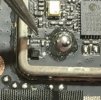
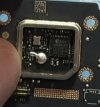
They did not disconnect the GPS chip, but instead put a piece of electrical tape between the GPS chip and its antenna connections. I suspect the lack of GPS info from the controller may not trigger a remote ID error that prevents the drone from flying because I don't think that broadcasting the pilots location is a requirement of remote ID; those 3rd party modules that you attach to drones that don't have the functionality built in don't transmit operator location.

The video is in a Russian telegram channel that doesn't allow downloads/screenshots. I'll see if I can figure something out.
 

DJI Drone Deals

New Threads

Forum statistics

Threads
139,694
Messages
1,650,826
Members
167,876
Latest member
jimcsnr
Want to Remove this Ad? Simply login or create a free account